Owner Guide
As the Owner, you have full access to run your business — from products and stock to reports and team. All of these pages live under /owner/* and are reachable from the sidebar.
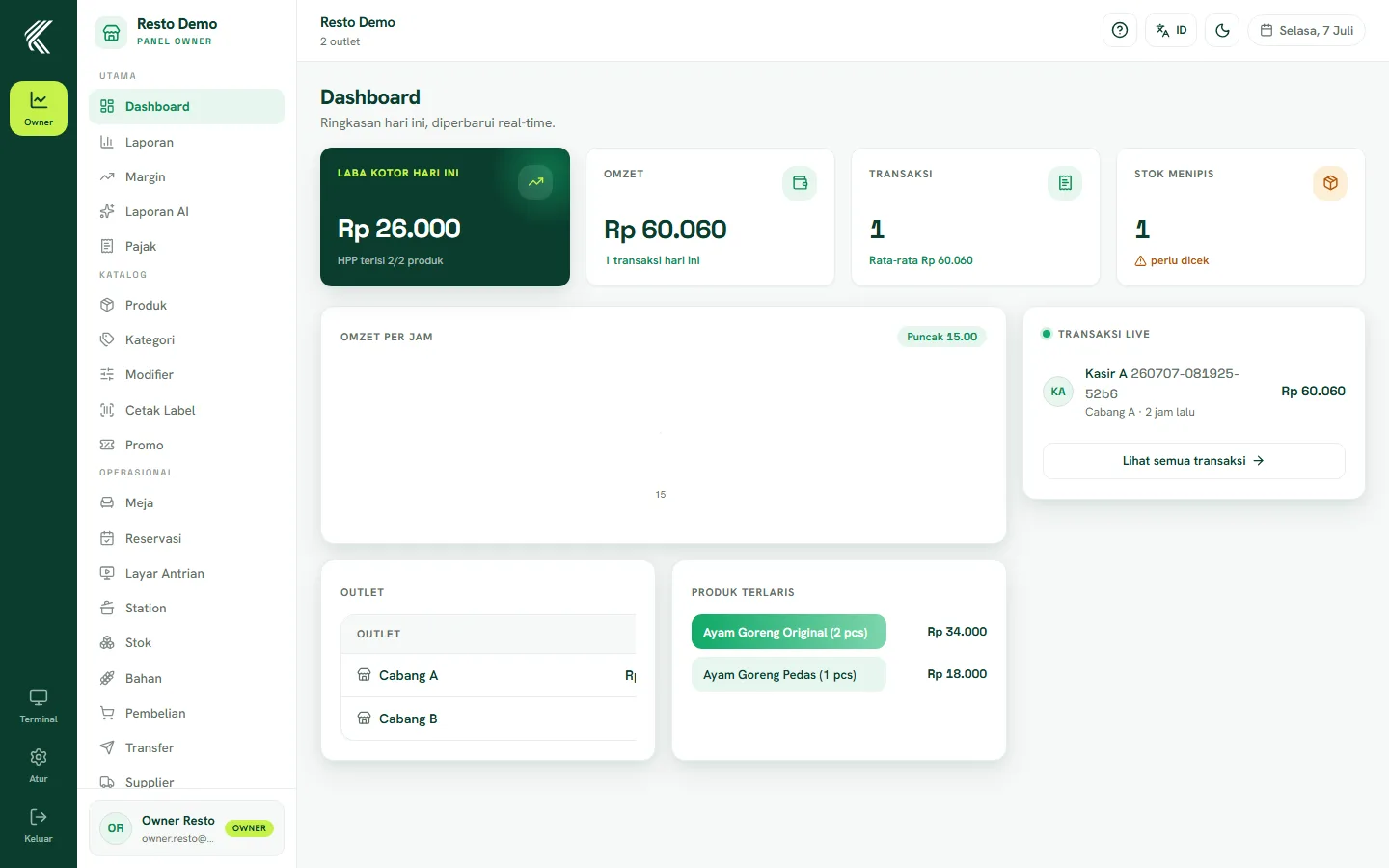
Dashboard & reports
The dashboard shows a live (real-time) summary of sales, profit, and recent activity. The Reports page gives deeper detail: sales per period, margin per product, and performance per outlet.
Products, categories & stock
Manage your catalog on the Products and Categories pages — this data is shared across all outlets. Physical stock is managed per outlet on the Stock page: receive incoming goods, adjust after a count, and mark items that are out of stock.
Outlets & team
Add new outlets/branches, set up staff (cashier, waiter, kitchen, manager) with their roles, and manage shift schedules from the Store & Team menu. Each staff member has access limited to their role and the outlet where they work.
Menu by business type
The Owner sidebar adapts to your business type:
- Retail — focused on products, stock, and cashier transactions.
- Restaurant — adds Tables and Stations menus to manage the layout and kitchen flow.
- Service — adds a Services menu to configure service types, stages, and order intake.
Settings & billing
In the Settings menu, configure your business profile, taxes, and other preferences. Your subscription status and payment history can be checked from the Billing menu.